Data Center Management Systems
The Expert JCL Manager - JED Download JED today! |
|
For additional information - Please refer to the JED Technical Overview |
|
The Future of Automated JCL Management
JED is a fully automated JCL management solution for today's z/OS
data centers providing JCL validation, standards enforcement,
reformatting and syntax checking. JCL maintenance, conversions and
tuning are now possible -- automatically! Robust, yet simple to
use, JED provides a flexible, automated way to address the
labor-intensive tasks associated with the JCL change lifecycle. JED
significantly improves operations and production control environments,
resulting in improved SLAs. JED has become the premier
automated JCL management product on the market today.
JED has been designed to be JCL intelligent. Incorporating JED into DCMS CCS (Change Control System) or other automated code deployment tools permits the management and control of JCL in the change lifecycle to be fully automated. JED simplifies JCL management and quality assurance, resulting in improved productivity and reliability for the entire Information Technology department.
JED ensures that the JCL entering your production environment is logically and syntactically error-free and will execute properly.
JED has been designed to be JCL intelligent. Incorporating JED into DCMS CCS (Change Control System) or other automated code deployment tools permits the management and control of JCL in the change lifecycle to be fully automated. JED simplifies JCL management and quality assurance, resulting in improved productivity and reliability for the entire Information Technology department.
JED ensures that the JCL entering your production environment is logically and syntactically error-free and will execute properly.
JED Highlights
- Complete JCL validation of basic syntax, required parameters and site standards
- Customized JCL validation rules
- One-time analysis and mass conversions
- JED Remote Server Facility validates JCL for execution on a different LPAR/Image than the one on which the JCL resides
- Validate SMS requirements
- Intelligent online Library Search Facility for concurrently searching multiple libraries for combinations of JCL statements containing values that match JCL-specific search criteria
- Validates logical execution processing (EXEC-COND, IF/THEN/ELSE) providing Return-Code simulation by jobstep
- Validates the execution PARM and SYSIN control statements for all standard IBM utilities
- Enforces Dataset naming standards
- Reformats JCL members, procs and statements to site standards for keyword order and alignment
- Provides reformatting options by statement type
- Optionally re-sequence jobstep names
- Optionally reformats instream IDCAMS SYSIN statements
- Scheduler Interface - Enables automated scheduler users to verify how their scheduler will resolve its variables add/or conditional statements within a jobstream at execution time.
- Single pass processing - one invocation of JED validates and re-formats JCL
Other uses for JED
- Maintaining JCL for multiple environments
- Management of vendor-supplied JCL
- Data center consolidations
- Production to test JCL conversion for application testing
- Test to production JCL conversion
- Critical path validation at hot site
- Convert in-stream control statements to PDS members
- Conversion or enforcement of SMS rules
- Optimize blocking characteristics
- Standards enforcement based on application name or environment
The JED Process:
- JED can be used in 3 ways:
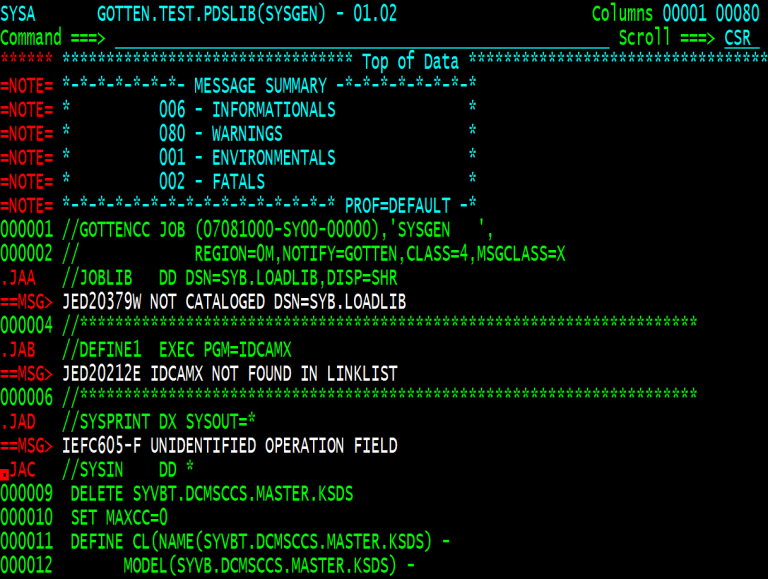
- Interactively - As an edit macro during an ISPF Edit session. Any error messages are shown interspersed withing the displayed JCL lines.
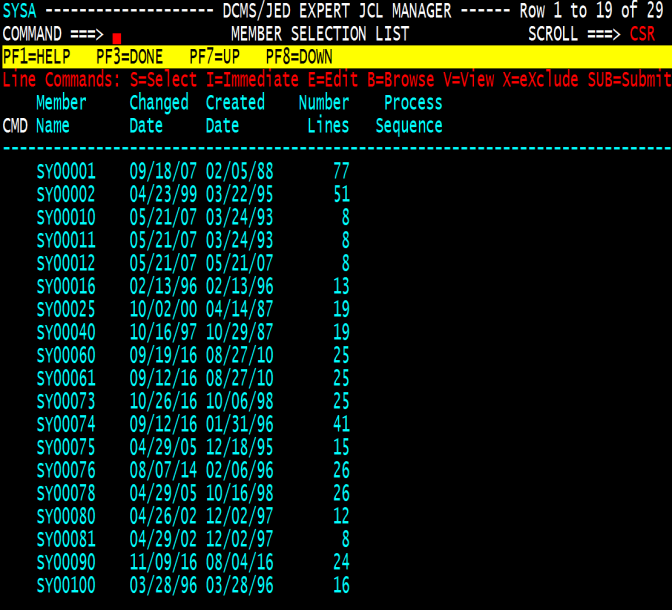
- Foreground - Within as ISPF application JED provides an intuitive interface for virtually instant results.
- Background - As a batch job to process larger quantities of JCL
- JED
can be interfaced
with your automated job scheduler, code deployment product, security and tape management software.
- All product features, functions and interfaces can be tailored by the JED administrator. Most common JCL validation and conversion tasks are already automated and can be activated by toggling an option presented on an online screen. Over 300 options are available.
Sample JED Screens
JED Major Features:
- JED JCL validation - JED automatically validates JCL for logic, syntax and required structure. User selectable options allow you to tailor the level of validation, error message issuance and message text. JED validates JCL based on the processing environment (z/OS and JES level, security package installed, and tape management tool in use, etc.)
- Validates JCL coding standards and checks JCL syntax
- Reformats JCL to Information Systems standards
- Verifies that datasets meet catalog control requirements
- Ensures that dataset names conform to installation standards
- Ensures that executed programs are found in the appropriate program load library
- Verifies JCL values such as input/output classes, form names and FCB’s
- Ensures that all referenced PDS members exist
- Ensures that all referenced GDG base catalog entries exist
- Validates SMS class values
- IBM Utility Control Statement Validation -
Validates the execution PARM and SYSIN control statements for all standard
IBM utilities including Sort, FTP and DF/DSS.
- Reformats IDCAMS Statements - Reformats
instream IDCAMS SYSIN statements to installation standards for content, coding and alignment.
- Job Scheduler Interface - Enables
Job Scheduler users to view how their scheduler will resolve the
scheduler variables and/or conditional statements within a jobstream at execution time. Most common scheduling systems are supported.
- JED Remote Server Facility - JEDSERV enables a user, working from a test LPAR/image, to accurately validate pre-production JCL that will later be executed on a different local or remote LPAR/image that does not share DASD with the test LPAR/image.
- JED Online Library Search Facility - JED
permits users to concurrently search multiple libraries for combinations
of JCL statements containing values that match JCL-specific search criteria.
- Searches are simple to specify and far superior to a simple string search.
- For example, you can search for DD statements that specify a BLKSIZE less than 100 and a DDname starting with “SYS” within a step that executes a program “IEBGENER”.
- The FIND and CHANGE primary commands also provide a Process Mode option, enabling interactive or background execution.
- This feature is JCL intelligent and makes it possible to quickly perform very complex searches without requiring the use of a programming language.
- JED Reporting - JED provides:
- Error summary
- Detailed JCL listing with embedded error messages
- Utility simulation results
- Original and Re-formatted JCL reports
- Tape Pull List
- Dataset, program and procedure cross-reference reports
- JED Installation, Configuration and Use - The JED software can be installed and implemented in a single day. The learning curve for system administrators and users is very short; usage is highly intuitive and self-explanatory; extensive online help screens and tutorials are available with a single key stroke.
- JED Programming Interface (JPI) - A site using JED can easily add customized validations by writing a JPI in a non-proprietary language, such as COBOL or assembler. The JED package includes a collection of JPI samples, and more samples can be found on the DCMS Customer Center website. JCL statements are presented to the JPI in a parsed format that is easy to work with. The JPI can manipulate the parsed JCL in many ways:
- Inspect all JCL parameters and instream data from all JCL statements
- Add, change or delete any JCL parameter or instream data statement
- Add or delete any JCL step
- Generate custom error messages
JED Benefits:
JED has become the industry leader in the automated JCL
management arena. JED is not just a JCL validation tool; it is a
fully automated and comprehensive JCL Management solution. JED
virtually eliminates all JCL errors in the production
environment. JED significantly reduces the amount of time
involved in JCL maintenance, development and conversion. JED provides automation
not found in any other JCL checking tool.
Operating Environment for JED
JED is available for any processor that supports the z/OS operating system environment and supports all versions of z/OS.
JED executes as a batch jobstep or as an interactive process under ISPF. Interfaces
to other products are described earlier in this document.
Service and Support
The DCMS toll-free Service and Support Hotline (952) 473-3572 is accessible 24 hours / 7 days a week. On-site training and consulting are available for a nominal fee.
60-day Trial
You can download JED, for a no-cost, no obligation trial.
Licensing/Pricing
Products are licensed (Perpetual and Renewable) on a per processor basis. Tiered pricing is based on Processor Software Groups. Annual maintenance for perpetual licenses is calculated at a rate of 15% of the current license fee.
JED Publications
- DCMS JED Administrator guide
- DCMS JED User Guide
- DCMS JED Upgrade Guide
- DCMS JED Change Guide
